
Broadcasting
Beginner
Featured
EGP 6,000.00
Online
vMix Live Broadcasting Director 101
12 Session
May 02, 2026
— May 15, 2026
English
About This Course
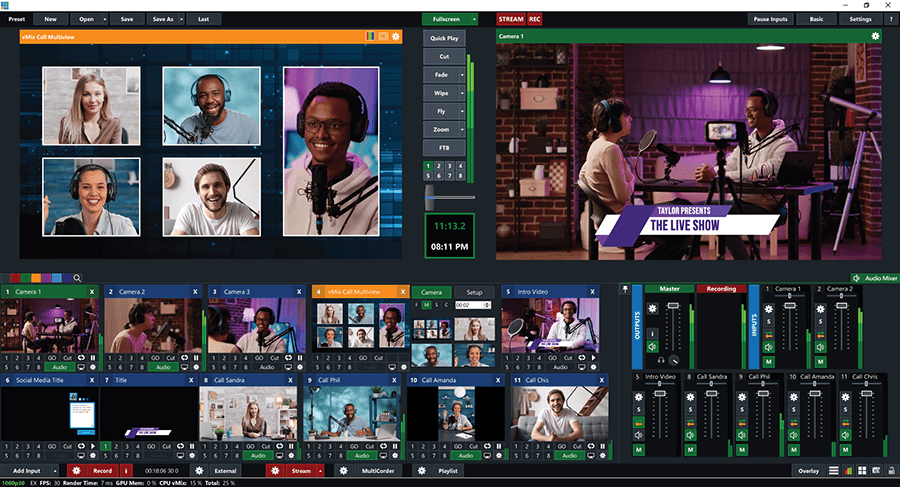
Learn how to direct and produce professional live broadcasts using vMix. This course is designed for beginners who want to understand the full live production workflow, from setting up cameras and audio to switching scenes, adding titles and overlays, managing remote guests, recording, and live streaming. Students will also learn how to use important vMix production tools such as inputs, audio mixing, external outputs, NDI, SRT, instant replay, and live call workflows. By the end of the course, students will be able to build and operate a complete live broadcast with confidence. vMix’s official materials cover core workflows including getting started, overlays, chroma key, outputs, recording, audio, inputs, replay, NDI, and streaming.
Course Details
Category
Broadcasting
Level
Beginner
Delivery
Online
Duration
12 Session
Language
English
Price
EGP 6,000.00
Start Date
May 02, 2026
End Date
May 15, 2026
Certificate
Included
What You'll Learn
-
Understand the vMix interface and live production workflow
-
Set up cameras, videos, audio sources, images, and browser inputs
-
Switch between sources professionally during a live production
-
Create scenes with titles, lower thirds, overlays, and transitions
-
Manage audio levels, buses, and clean broadcast sound
-
Configure live streaming and recording settings
-
Use NDI and SRT for modern IP-based production workflows
-
Add and manage remote guests and live callers
-
Use instant replay basics for sports and event production
-
Organize productions for churches, podcasts, events, sports, and online shows
-
Build confidence as a live broadcast director using vMix’s core production tools. Official vMix documentation describes output, streaming, recording, external output, NDI, SRT, replay, and call-related workflows as part of the platform.
Requirements
- Basic computer knowledge
- Basic understanding of video and audio is helpful but not required
- A Good Windows PC or laptop
- vMix installed on the computer (trial or licensed version)
- Internet connection for streaming practice and remote guest sessions
- Headset or microphone recommended for audio practice
- Passion to learn live broadcasting and production
Certificate
Certificate of Completion
Students will receive a Certificate of Completion after successfully completing the course and passing the final practical live production assessment. Certificate issued by [TKDS MENA , TKDS MEDIA USA ]. This is a professional training certificate for course completion and practical skills achievement.